Copyright, Creative Common (CC) Licenses, Fair Use
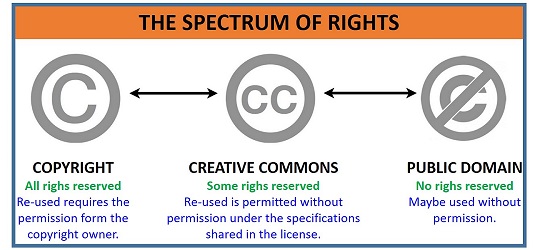
Copyright, Creative Common (CC) Licenses, Fair Use
Basic principles of copyright in New Zealand:
- Copyright is applied automatically to any published work.
- Anything that has been published is copyrighted.
- Copyright lasts past the lifetime of the creator.
4 types of CC license:
-
 Attribution (CC-BY): allows others to distribute,
adapt, remix, and adapt your work provided they credit you.
Attribution (CC-BY): allows others to distribute,
adapt, remix, and adapt your work provided they credit you.
-
 Attribution-ShareAlike (CC-BY-SA): others can
remix, adapt and build on your work. Creator must be credited, and derived works
must have same CC license.
Attribution-ShareAlike (CC-BY-SA): others can
remix, adapt and build on your work. Creator must be credited, and derived works
must have same CC license.
-
 Attribution-NonCommercial-ShareAlike
(CC-BY-NC-SA): Others may remix and change your work but not for commercial use,
and license on derivatives must be same.
Attribution-NonCommercial-ShareAlike
(CC-BY-NC-SA): Others may remix and change your work but not for commercial use,
and license on derivatives must be same.
-
 Attribute-NonCommercial-NoDerivs
(CC-BY-NC-ND): Most restrictive. Others can download and share your work but no
changes and no commercial use.
Attribute-NonCommercial-NoDerivs
(CC-BY-NC-ND): Most restrictive. Others can download and share your work but no
changes and no commercial use.
'Fair use' is a term primarily used in the USA. It means that copyrighted material can be used without permission for criticism, reporting, teaching and research, which are not permitted under copyright but could be justified. In NZ we have 'fair dealing' which describes lawful uses of copyrighted material without having to get permission: criticism, review, reporting, private study, and research.
What's Fair use and does it apply in NZ?Privacy and Web Privacy Policy

Privacy and Web Privacy Policy
What is a privacy policy? A privacy policy states how your business/website complies with NZ privacy laws. It details what you do with any private information that is collected from customers/website visitors. It should also contain contact details.
Privacy Policy
- Personal data is collected only for the purposes of verifying one survey response per person.
- We promise not to spam you, should you choose to provide your email address to us.
- We will not disclose any of your personal information to third parties.
- You may opt out of providing information, and amy information we hold about you shall be immediately removed at your request.
- Any survey data that is used to derive statistics will be fully anonymised first.
Contact email: jwintringham[at]yahoo.com
Key clauses for your New Zealand Privacy PolicyHow to improve your website SEO

How to improve your website SEO
5 ways to improve visibility on search engines:
- Keyword research: use keywords that reflect what your audience is looking to find.
- Good technical design: responsive, use meta tags.
- Optimise your search appearance: refine title tags, breadcrumbs, favicon.
- Install web analytics
- Measure and prioritise SEO: regularly check and find out what's working and change approach if necessary.
Features you should know when choosing a web hosting provider

Features you should know when choosing a web hosting provider
3 major factors to consider:
- Cost: Are there hidden costs? Are you getting your money's worth? Is it worth paying a bit more for the service you require?
- Available storage: This will depend on what the purpose is of your website.
- Data security: Do they back up data regularly? Is your data safe from data mining apps or hackers?
Web Performance and Maintenance
Web Performance and Maintenance
5 ways to reduce page loading time:
- Keep image files small: compress, compress, compress. JPG or PNG are best.
- Write using mobile first methodology: First write code for mobile devices, then adapt to desktop later.
- Minify and combine files: This reduces size of files by removing and/or shortening symbols in the code.
- Load JavaScript asynchronously: This means the script will be loaded independently of the page, which means no delays waiting for the js to load. Script tags should also be put at the bottom of the page to enable asynchronicity for older browsers.
- Use caching: This stores a temporary version of your files in a cache that allows for faster loading, as some of the website is ready to load. NOTE: May cause issues with a realtime service, as info may not be up to date.
5 important actions to carry out during website maintenance:
- Repair any dead links and errors.
- Check search rankings to see if you need to up your SEO game.
- Test different browsers to ensure your website is compatible with each of them.
- Publish fresh content to keep your site interesting.
- Perform backups regularly.
Web Security

Web Security
5 common cyber attacks:
- Vulnerabilities in software are exploited
- Ransomware: hackers gain access to files, remove access by owner of files, then demand money to restore access.
- Insider threats: Users of a system that are corrupt pose a greater threat than hackers on the outside.
- Supply chain attacks: Hackers access supply chain technology and get source codes and other infrastructure components.
- DDoS attacks: Attackers flood the system with data, so that the system cannot cope and becomes impossible to access.
Actions to prevent cybersecurity threats:
- Keep software updated.
- Don't allow files to be uploaded to your website.
- Ensure passwords used are complex, and add further protection by encryption. Suggested: one way hashing.
- Kepp error messages succinct, don't give away your secrets eg. database passwords or API keys.
- Beware of SQL injection where an attacker can input SQL into a webform and gain access. Always use parameterised queries.